Inverse Kinematics and Foot Locking
30/07/2026
One of my most requested blog posts has always been something on inverse kinematics and foot locking. That isn't surprising - foot sliding is something that affects almost all animation systems, and proper foot locking and inverse kinematics is something that is tricky to get right, yet can have a huge positive impact on the visual quality of the resulting animation.
But speak to any two animation programmers and they will likely give you two completely different answers as to the best way to solve foot-sliding. Undoubtedly this topic is much more of an art than a science - which might explain why it isn't always easy to find resources on it - and why it gets less attention in the academic sphere.
With that being said, I thought I would share a selection of little recipes related to solving foot-sliding. And while I'm certain these are not the proven-best solutions to this problem (and there are likely many games which do it better), they have served me well over the years, and so should make a good starting point for anyone getting into the topic.
For digestibility I've split the topic into a few parts. First I'll cover my method for solving a leg chain to position the toe at a desired location. Second, I'll cover my solution for locking the position of the toe during contacts at runtime using inertialization. Third, a technique for automatically annotating contacts in animation data. Fourth, an offline method for foot sliding removal for when you have access to the whole animation and cycles to spare. And finally I'll close with a few philosophical thoughts about the whole thing.
While I provide code through the article, the full source code for this article can be found here.
Solving a Leg Chain
Overview
Here is the problem set-up. We have a chain of joints for the leg of a character, posed in a particular configuration, and we want to modify the local rotations such that the existing pose is preserved as much as possible, but where the toe ends up at some desired location:
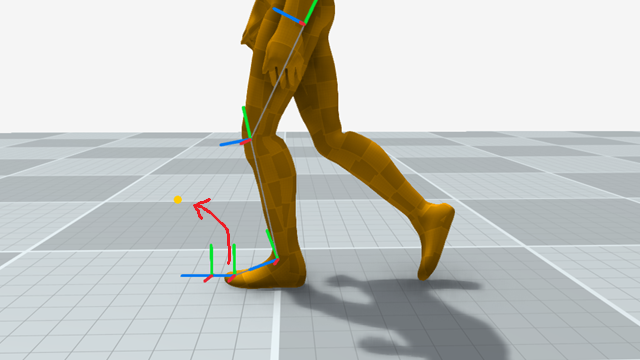
To do this we're going to perform the following steps:
- Compute the target heel location from the target toe location
- Solve the two-joint IK problem to position the heel at its target
- Rotate the heel joint to orient the toe towards the toe target
- Optionally rotate the toe-end to resolve any ground collisions
Find the Heel Target
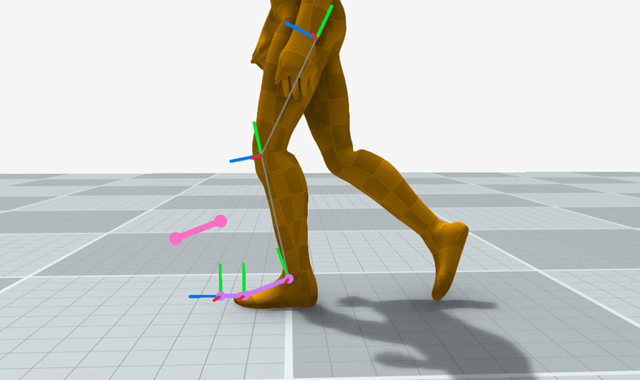
Computing the desired heel location is easy - we simply compute the vector from the toe to the heel in the existing input pose and add this to the toe target.
    *targetHeel = Vector3Add(*targetToe, Vector3Subtract(
        globalTransforms[heelBoneIndex].translation,
        globalTransforms[toeBoneIndex].translation));
Which looks like this:
2. Solve for the Heel Target
Once we have the heel target we can solve for the local rotations of the hip and knee joints such that it positions the leg chain correctly. To do this I'm going to use a slightly modified version of the two bone inverse kinematics code I shared a long time ago (see this page for the derivation of the QuaternionFromScaledAngleAxis function).
static inline Quaternion QuaternionExp(Vector3 v)
{
    float halfangle = sqrtf(v.x*v.x + v.y*v.y + v.z*v.z);

    if (halfangle < 1e-4f)
    {
        return QuaternionNormalize((Quaternion){ v.x, v.y, v.z, 1.0f });
    }
    else
    {
        float c = cosf(halfangle);
        float s = sinf(halfangle) / halfangle;
        return (Quaternion){ s * v.x, s * v.y, s * v.z, c };
    }
}

static inline Quaternion QuaternionFromScaledAngleAxis(Vector3 v)
{
    return QuaternionExp(Vector3Scale(v, 0.5f));
}

static inline void TwoBoneInverseKinematics(
    Quaternion *localHip,
    Quaternion *localKnee,
    Transform globalPelvis,
    Transform globalHip,
    Transform globalKnee,
    Transform globalHeel,
    Vector3 targetHeel,
    Vector3 sideVector,
    float maxExtension,
    float softening)
{
    // Softly clamp the target based on the distance given by maxExtension

    Vector3 targetClamp = targetHeel;
    float targetLength = Vector3Distance(targetHeel, globalHip.translation);

    if (targetLength > maxExtension - softening)
    {
        // Smoothly clamp when it gets within softening distance of the maxExtension

        float saturation = 1.0f - expf(
            -Max(targetLength - maxExtension + softening, 0.0f) / softening);

        targetClamp = Vector3Add(
            globalHip.translation,
            Vector3Scale(Vector3Subtract(targetHeel, globalHip.translation),
                (maxExtension - softening + softening * saturation) / targetLength));
    }

    // Compute the rotation axis based on vector perpendicular to the plane
    // rotation which is closed to the provided knee side vector

    Vector3 axisDwn = Vector3Normalize(
        Vector3Subtract(globalHeel.translation, globalHip.translation));

    Vector3 axisFwd = Vector3Normalize(Vector3CrossProduct(axisDwn, sideVector));
    Vector3 axisRot = Vector3Normalize(Vector3CrossProduct(axisDwn, axisFwd));

    Vector3 a = globalHip.translation;
    Vector3 b = globalKnee.translation;
    Vector3 c = globalHeel.translation;
    Vector3 t = targetClamp;

    // Compute the change in rotation angle required using the cosine rule

    float lab = Vector3Distance(b, a);
    float lcb = Vector3Distance(b, c);
    float lat = Vector3Distance(t, a);
    float lca = Vector3Distance(a, c);

    float acab0 = acosf(Clamp(Vector3DotProduct(
        Vector3Scale(Vector3Subtract(c, a), 1.0f / lca),
        Vector3Scale(Vector3Subtract(b, a), 1.0f / lab)), -1.0f, +1.0f));

    float babc0 = acosf(Clamp(Vector3DotProduct(
        Vector3Scale(Vector3Subtract(a, b), 1.0f / lab),
        Vector3Scale(Vector3Subtract(c, b), 1.0f / lcb)), -1.0f, +1.0f));

    float acab1 = acosf(Clamp(
        (lab * lab + lat * lat - lcb * lcb) / (2.0 * lab * lat), -1.0f, +1.0f));

    float babc1 = acosf(Clamp(
        (lab * lab + lcb * lcb - lat * lat) / (2.0 * lab * lcb), -1.0f, +1.0f));

    // Compute the three world-space rotations needed to solve the two-bone ik problem

    Quaternion r0 = QuaternionFromScaledAngleAxis(Vector3Scale(axisRot, acab1 - acab0));
    Quaternion r1 = QuaternionFromScaledAngleAxis(Vector3Scale(axisRot, babc1 - babc0));
    Quaternion r2 = QuaternionNormalize(QuaternionBetween(
        Vector3Subtract(globalHeel.translation, globalHip.translation),
        Vector3Subtract(targetClamp, globalHip.translation)));

    // Update the local space rotations for the hip and the knee

    *localHip = QuaternionMultiply(QuaternionMultiply(QuaternionMultiply(
        QuaternionInvert(globalPelvis.rotation), r2), r0), globalHip.rotation);

    *localKnee = QuaternionMultiply(QuaternionMultiply(
        QuaternionInvert(globalHip.rotation), r1), globalKnee.rotation);
}
The two additions here are simple. First, I let the user provide a max extension length maxExtension which I softly clamp the target towards based on the softening distance. This means that the limb only ever exponentially approaches the provided maxExtension, which helps prevent hyper-extension:
    Vector3 targetClamp = targetHeel;
    float targetLength = Vector3Distance(targetHeel, globalHip.translation);

    if (targetLength > maxExtension - softening)
    {
        // Smoothly clamp when it gets within softening distance of the maxExtension

        float saturation = 1.0f - expf(
            -Max(targetLength - maxExtension + softening, 0.0f) / softening);

        targetClamp = Vector3Add(
            globalHip.translation,
            Vector3Scale(Vector3Subtract(targetHeel, globalHip.translation),
                (maxExtension - softening + softening * saturation) / targetLength));
    }
Second, I use the side vector of the knee joint to find a stable axis to rotate around. This prevents the need for a pole-vector or anything like that.
    Vector3 axisDwn = Vector3Normalize(
        Vector3Subtract(globalHeel.translation, globalHip.translation));

    Vector3 axisFwd = Vector3Normalize(Vector3CrossProduct(axisDwn, sideVector));
    Vector3 axisRot = Vector3Normalize(Vector3CrossProduct(axisDwn, axisFwd));
Assuming you have two buffers localTransforms and globalTransforms filled with bone local and global transforms, you can call the function like this:
    // Solve Two-Bone Inverse Kinematics to place heel

    Vector3 sideVector = Vector3RotateByQuaternion(
        kneeSideVector,
        globalTransforms[kneeBoneIndex].rotation);

    float maxExtension = Vector3Distance(
        globalTransforms[hipBoneIndex].translation,
        globalTransforms[heelBoneIndex].translation);

    Quaternion modifiedHip, modifiedKnee;

    TwoBoneInverseKinematics(
        &modifiedHip,
        &modifiedKnee,
        globalTransforms[pelvisBoneIndex],
        globalTransforms[hipBoneIndex],
        globalTransforms[kneeBoneIndex],
        globalTransforms[heelBoneIndex],
        *targetHeel,
        sideVector,
        maxExtension,
        softening);

    localTransforms[hipBoneIndex].rotation = modifiedHip;
    localTransforms[kneeBoneIndex].rotation = modifiedKnee;
Where, for the geno character, kneeSideVector is just (Vector3){ 1.0f, 0.0f, 0.0f } and a typical value for softening might be 0.005f (meters).
Once completed this positions the heel at the target, but the local rotation we've applied means that the toe joint is no longer rotated toward its target.
3. Solve for the Toe Target
To solve for the toe target we can just perform a basic look-at using QuaternionBetween (For the curious, I wrote a bit about the derivation of this function here):
static inline Quaternion QuaternionBetween(Vector3 p, Vector3 q)
{
    Vector3 c = Vector3CrossProduct(p, q);

    Quaternion o = {
        c.x,
        c.y,
        c.z,
        sqrtf(Vector3DotProduct(p, p) * Vector3DotProduct(q, q)) +
            Vector3DotProduct(p, q),
    };

    return QuaternionLength(o) < 1e-8f ?
        QuaternionFromAxisAngle((Vector3){ 1.0f, 0.0f, 0.0f }, PI) :
        QuaternionNormalize(o);
}

static inline Quaternion BoneOrientTowards(
    Transform boneParentTransform,
    Transform boneTransform,
    Transform boneChildTransform,
    Vector3 target)
{
    Quaternion desiredRotation = QuaternionMultiply(QuaternionNormalize(
        QuaternionBetween(
            Vector3Subtract(boneChildTransform.translation, boneTransform.translation),
            Vector3Subtract(target, boneTransform.translation))),
            boneTransform.rotation);

    return QuaternionMultiply(
        QuaternionInvert(boneParentTransform.rotation), desiredRotation);
}
Which can be used as follows:
        ForwardKinematics(globalTransforms, localTransforms, model);

        localTransforms[heelBoneIndex].rotation = BoneOrientTowards(
            globalTransforms[kneeBoneIndex],
            globalTransforms[heelBoneIndex],
            globalTransforms[toeBoneIndex],
            *targetToe);
And gives the following behaviour:
4. Handle Ground-Plane collisions
A nice addition we can do is collide the targets with the ground plane. First, we need to find the heel and toe height in the bind pose (assume globalTransforms is filled with the bind pose transforms):
    float heelMinHeight = globalTransforms[leftHeelBoneIndex].translation.y;
    float toeMinHeight = globalTransforms[leftToeBoneIndex].translation.y;
    float toeEndMinHeight = globalTransforms[leftToeEndBoneIndex].translation.y;
Then we clamp the targets to their respective heights during the leg solve.
targetToe->y = Max(targetToe->y, toeMinHeight);targetHeel->y = Max(targetHeel->y, heelMinHeight);When doing this we then might want to also re-orient the toe-end since if we clamp the bone height to prevent the end of the toe from intersecting the floor, the rotation should change with it.
        ForwardKinematics(globalTransforms, localTransforms, model);

        *targetToeEnd = globalTransforms[toeEndBoneIndex].translation;

        if (enableHeightClamp)
        {
            targetToeEnd->y = Max(targetToeEnd->y, toeEndMinHeight);
        }

        localTransforms[toeBoneIndex].rotation = BoneOrientTowards(
            globalTransforms[heelBoneIndex],
            globalTransforms[toeBoneIndex],
            globalTransforms[toeEndBoneIndex],
            *targetToeEnd);
Which gives the following result (here visualised with some vertical offset applied to the pelvis to make it clearer).
Conclusion
Putting everything together we get:
static inline void SolveLegChain(
    Model model,
    Transform* localTransforms,
    Transform* globalTransforms,
    Vector3 target,
    Vector3 *targetHeel,
    Vector3 *targetToe,
    Vector3 *targetToeEnd,
    int pelvisBoneIndex,
    int hipBoneIndex,
    int kneeBoneIndex,
    int heelBoneIndex,
    int toeBoneIndex,
    int toeEndBoneIndex,
    bool enableHeightClamp,
    bool enableHeelLookAt,
    bool enableToeLookAt,
    float heelMinHeight,
    float toeMinHeight,
    float toeEndMinHeight,
    float softening,
    Vector3 kneeSideVector)
{
    *targetToe = target;

    if (enableHeightClamp)
    {
        targetToe->y = Max(targetToe->y, toeMinHeight);
    }

    // Find the Heel Target Location

    *targetHeel = Vector3Add(*targetToe, Vector3Subtract(
        globalTransforms[heelBoneIndex].translation,
        globalTransforms[toeBoneIndex].translation));

    if (enableHeightClamp)
    {
        targetHeel->y = Max(targetHeel->y, heelMinHeight);
    }

    // Solve Two-Bone Inverse Kinematics to place heel

    Vector3 sideVector = Vector3RotateByQuaternion(
        kneeSideVector,
        globalTransforms[kneeBoneIndex].rotation);

    float maxExtension = Vector3Distance(
        globalTransforms[hipBoneIndex].translation,
        globalTransforms[heelBoneIndex].translation);

    Quaternion modifiedHip, modifiedKnee;

    TwoBoneInverseKinematics(
        &modifiedHip,
        &modifiedKnee,
        globalTransforms[pelvisBoneIndex],
        globalTransforms[hipBoneIndex],
        globalTransforms[kneeBoneIndex],
        globalTransforms[heelBoneIndex],
        *targetHeel,
        sideVector,
        maxExtension,
        softening);

    localTransforms[hipBoneIndex].rotation = modifiedHip;
    localTransforms[kneeBoneIndex].rotation = modifiedKnee;

    // Orient Toe towards Target

    if (enableHeelLookAt)
    {
        ForwardKinematics(globalTransforms, localTransforms, model);

        localTransforms[heelBoneIndex].rotation = BoneOrientTowards(
            globalTransforms[kneeBoneIndex],
            globalTransforms[heelBoneIndex],
            globalTransforms[toeBoneIndex],
            *targetToe);
    }

    // Orient Toe-End

    if (enableToeLookAt)
    {
        ForwardKinematics(globalTransforms, localTransforms, model);

        *targetToeEnd = globalTransforms[toeEndBoneIndex].translation;

        if (enableHeightClamp)
        {
            targetToeEnd->y = Max(targetToeEnd->y, toeEndMinHeight);
        }

        localTransforms[toeBoneIndex].rotation = BoneOrientTowards(
            globalTransforms[heelBoneIndex],
            globalTransforms[toeBoneIndex],
            globalTransforms[toeEndBoneIndex],
            *targetToeEnd);
    }

    // Recompute final global transforms

    ForwardKinematics(globalTransforms, localTransforms, model);
}
You'll notice that I'm being lazy here and re-computing the full set of global transforms with the ForwardKinematics function each time we update the local transforms, but obviously in reality we only need to re-compute the global transforms for the bones which we're intending to use in the next stage.
Similarly, I'm clamping the heights assuming the ground plane is at zero here but if you have dynamic terrain you're going to need to do a raycast or simlar to get the real height of the ground under-foot.
But what this function ultimately gives us is a kind of black box where we can input an existing pose of the character and a new toe target, and always get something relatively sane as output. This greatly simplifies the problem of foot locking because now all we need to do is make sure our toe target is not sliding, and we can be relatively confident our results will look good.
Foot Locking
In the previous part we learned how we can solve a leg joint chain using some inverse kinematics and other tricks to place the toe joint at some target location.
In this part I'm going to show you my little recipe for locking the toe target during contact states. The way it works is very simple. When there is no contact active, we follow the toe position in the input source animation. When there is a contact active, we follow a static position on the floor which was the toe's location when the contact first became active. And we transition between these two sources using inertialization.
There are a bunch of variables we need to keep track of the state of things in the foot locking setup. For each contact point we'll need the following variables:
typedef struct FootLockingState
{
    Vector3 position;           // Current Position
    Vector3 velocity;           // Current Velocity
    Vector3 inputPosition;      // Input Source Position
    Vector3 inputVelocity;      // Input Source Velocity
    Vector3 offsetPosition;     // Inertialization Offset
    Vector3 offsetVelocity;     // Inertialization Offset Velocity
    float time;                 // Time since Inertialization transition
    Vector3 contact;            // Contact Location
    bool locked;                // If the contact is currently locked

} FootLockingState;
Then, at each frame, we can write a function which takes as input this state, as well as the toe location in the input pose, and updates the toe target, as follows:
void UpdateFootLockingState(
    FootLockingState* state,
    Vector3 inputPosition,
    bool inputContact,
    float contactHeight,
    float deltaTime,
    float unlockDistance,
    float lockDistance,
    float blendTime)
{
    // Update Input State Position and Velocity via finite difference

    state->inputVelocity = Vector3Scale(
        Vector3Subtract(inputPosition, state->inputPosition),
        1.0f / Max(deltaTime, 1e-8f));

    state->inputPosition = inputPosition;

    // Update Cubic Inertialization

    InertializeCubicUpdate(
        &state->position,
        &state->velocity,
        &state->time,
        state->locked ? state->contact : state->inputPosition,
        state->locked ? Vector3Zero() : state->inputVelocity,
        state->offsetPosition,
        state->offsetVelocity,
        deltaTime,
        blendTime);

    // Check the distance of the input location from the locked state

    float inputDistance = Vector3Distance(state->position, state->inputPosition);

    if (!state->locked && inputContact && inputDistance < lockDistance)
    {
        // Lock if the input wants it the current state is within locking distanced

        state->locked = true;
        state->contact = state->inputPosition;
        state->contact.y = contactHeight;

        InertializeCubicTransition(
            &state->offsetPosition,
            &state->offsetVelocity,
            &state->time,
            state->inputPosition,
            state->inputVelocity,
            state->contact,
            Vector3Zero(),
            blendTime);
    }
    else if (state->locked && (!inputContact || inputDistance > unlockDistance))
    {
        // Unlock if the input wants to unlock or the distance is too far

        state->locked = false;

        InertializeCubicTransition(
            &state->offsetPosition,
            &state->offsetVelocity,
            &state->time,
            state->contact,
            Vector3Zero(),
            state->inputPosition,
            state->inputVelocity,
            blendTime);
    }
}
where InertializeCubicUpdate and InertializeCubicTransition are cubic inertialization functions defined as follows...
void InertializeCubicUpdate(
    Vector3* position,
    Vector3* velocity,
    float* time,
    Vector3 inputPosition,
    Vector3 inputVelocity,
    Vector3 offsetPosition,
    Vector3 offsetVelocity,
    float deltaTime,
    float blendTime)
{
    float t = Clamp((*time + deltaTime) / Max(blendTime, 1e-8f), 0.0f, 1.0f);
    float w0 = 2.0f * t * t * t - 3.0f * t * t + 1.0f;
    float w1 = (t * t * t - 2.0f * t * t + t) * blendTime;
    float w2 = (6.0f * t * t - 6.0f * t) / Max(blendTime, 1e-8f);
    float w3 = 3.0f * t * t - 4.0f * t + 1.0f;

    *position = Vector3Add(inputPosition, Vector3Add(
        Vector3Scale(offsetPosition, w0), Vector3Scale(offsetVelocity, w1)));
    *velocity = Vector3Add(inputVelocity, Vector3Add(
        Vector3Scale(offsetPosition, w2), Vector3Scale(offsetVelocity, w3)));
    *time = *time + deltaTime;
}

void InertializeCubicTransition(
    Vector3* offsetPosition,
    Vector3* offsetVelocity,
    float* time,
    Vector3 sourcePosition,
    Vector3 sourceVelocity,
    Vector3 destinationPosition,
    Vector3 destinationVelocity,
    float blendTime)
{
    float t = Clamp(*time / Max(blendTime, 1e-8f), 0.0f, 1.0f);
    float w0 = 2.0f * t * t * t - 3.0f * t * t + 1.0f;
    float w1 = (t * t * t - 2.0f * t * t + t) * blendTime;
    float w2 = (6.0f * t * t - 6.0f * t) / Max(blendTime, 1e-8f);
    float w3 = 3.0f * t * t - 4.0f * t + 1.0f;

    *offsetPosition = Vector3Subtract(Vector3Add(sourcePosition,
        Vector3Add(Vector3Scale(*offsetPosition, w0),
                   Vector3Scale(*offsetVelocity, w1))), destinationPosition);
    *offsetVelocity = Vector3Subtract(Vector3Add(sourceVelocity,
        Vector3Add(Vector3Scale(*offsetPosition, w2),
                   Vector3Scale(*offsetVelocity, w3))), destinationVelocity);
    *time = 0.0f;
}
The logic may look complex but it is fairly simple. If the input animation says the foot is locked (and the distance between the current output and the new input is low enough), we record the contact location and transition to following this as input. If the input animation says the foot is unlocked (or the distance between the output and the input is too large) we switch back to tracking the input location.
With this we get a toe target which we can smoothly toggle in and out of a locked state (shown here in yellow):
All that remains is to plug this target into the solver we made in the previous part, and we can force the toe into a locked position during contact times:
            UpdateFootLockingState(
                &leftLockState,
                globalTransforms[leftToeBoneIndex].translation,
                testContacts.leftContacts[animationFrame] > contactThreshold,
                toeMinHeight,
                deltaTime,
                unlockDistance,
                lockDistance,
                lockBlendTime);

            leftTarget = leftLockState.position;

            if (enableInverseKinematics)
            {
                SolveLegChain(
                    genoModel,
                    modifyTransforms,
                    globalTransforms,
                    leftTarget,
                    &leftTargetHeel,
                    &leftTargetToe,
                    &leftTargetToeEnd,
                    pelvisBoneIndex,
                    leftHipBoneIndex,
                    leftKneeBoneIndex,
                    leftHeelBoneIndex,
                    leftToeBoneIndex,
                    leftToeEndBoneIndex,
                    enableHeightClamp,
                    enableHeelLookAt,
                    enableToeLookAt,
                    heelMinHeight,
                    toeMinHeight,
                    toeEndMinHeight,
                    softening,
                    (Vector3){ 1.0f, 0.0f, 0.0f });
            }
Which looks like this:
But how do we get contact time labels in the input animation? Well for that I have another little recipe...
Contact Times
To use the foot locking code we wrote in the previous part, we need to know in the input animation when the toe is meant to be in contact with the floor (and so therefore should not slide).
Typically, this is something we want to add to our animation data as additional meta-data. The only gold-standard for the annotation of such contact times is to manually label them - but we can use a few simple heuristics to get us about 90% of the way there.
The general idea is to look at the global velocity magnitude of the toe joints in the source animation:
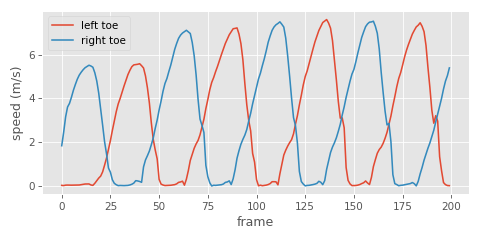
Here we can see quite clearly when the velocity is low and the foot is in contact with the ground, which is good news - it looks like this signal should be fairly easy to threshold to get something that approximates binary contact labels:
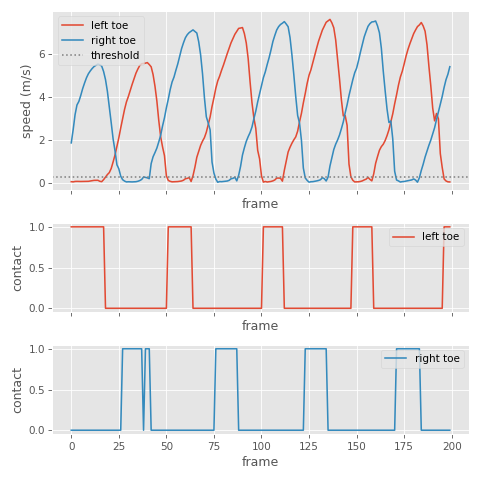
This is much more useful than toe height, as people tend to not lift their feet very much during locomotion and even during contact the height can go up and down a bit. This makes toe height much more difficult to threshold.
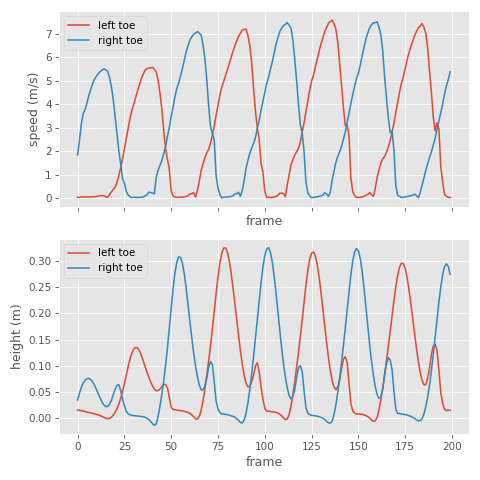
But foot height can still be a good sanity check, and avoid labelling contacts for when the foot is stationary but held in the air - so we can combine a thresholding of both of these signals if we want.
In most high quality animation data I find that between 0.5 m/s and 0.1 m/s tends to be a pretty reasonable velocity threshold and 0.1 m is a pretty reasonable height threshold (although that of course depends on your toe positioning on the skeleton).
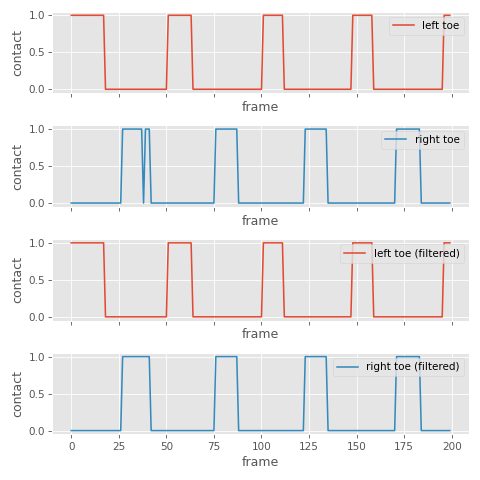
There are a few post-processes I like to apply to the thresholded signal afterwards.
The first is a majority vote filter - a filter which slides over a short window of frames and takes a majority vote to decide the output for the frame centered at that window. This filter helps avoid single-frame activations or deactivations of the contact (in numpy I actually use the median filter which ends up doing the same thing for binary signals), where a width of 5 frames at 60Hz is a pretty good start.
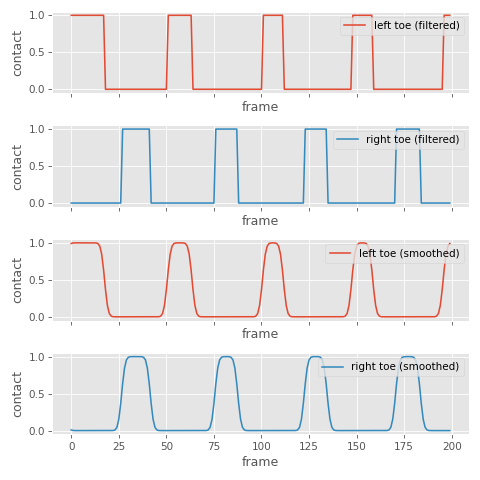
Sometimes I also like to apply Gaussian smoothing. This turns our binary signal into a continuous one, which allows us to threshold our contact activations at runtime in a way that gives us some buffer time in adjusting the sensitivity and how early or late we want the contact to kick in:
This heutristic is far from fool-proof and I still find it difficult to always get contacts labelled cleanly during running animations. Part of the problem here is that the shoe and foot deformation can be relatively large for fast runs (the foot can move up and down a fair amount), and contact times can be relatively short.
At 30Hz contacts during a run can often be only 1 or 2 frames. Which means combined with the majority vote filter even a little bit of movement can mean you miss them. So keeping animation data at 60Hz really helps a lot here.
And if you are up-sampling from a 30Hz signal, velocities computed via cubic interpolation also tend to be more easy to threshold compared to those computed via linear interpolation. So automatic contact annotation is a good example of when it really pays to look after your data carefully.
In the next part I'll discuss an alternative method for resolving foot-sliding offline.
Offline foot locking
If we have access to the whole animation clip, and we have some cycles to spare, it's possible to take an entirely different approach to removing foot sliding than the one we used at runtime using inertialization.
I've found it is possible to get better results if we formulate the foot-sliding problem as a set of constraints, and then solve those constraints using a position-based-dynamics-like method. This sounds complicated, and understanding all of the theory behind why it works can be - but the actual implementation itself is very simple.
The general idea is this: let's compute the pelvis, and toe positions for every frame, and treat all of these positions as a set of connected particles. We're going to try and make the relative position of these particles between frames, as well as the relative positions of these particles within each frame, be similar to the input animation using soft spring-like connections. Then, we'll add additional harder connections that enforce that there is zero distance between frames for toe particles that are considered in-contact. This will effectively "bunch together" all of the toe particles during contact times, and distribute the effect of this adjustment nicely over the rest of the animation.
They way we'll enforce these constraints is simply by looping over the full animation many times and, for each constraint, slightly adjusting the particles it affects to try and make the constraint better satisfied. In the end we should get out a new set of pelvis and toe targets which don't exhibit foot sliding, but which preserve the existing animation, and which we can feed into our leg solver to adjust the local rotations.
First, let's compute the left toe, right toe, and pelvis locations in the input animation. These are the arrays we are going to modify to enforce the constraints.
    Vector3* pelvisLocations = RL_CALLOC(animation.frameCount, sizeof(Vector3));
    Vector3* leftToeLocations = RL_CALLOC(animation.frameCount, sizeof(Vector3));
    Vector3* rightToeLocations = RL_CALLOC(animation.frameCount, sizeof(Vector3));

    for (int i = 0; i < animation.frameCount; i++)
    {
        pelvisLocations[i] = animation.framePoses[i][pelvisBoneIndex].translation;
        leftToeLocations[i] = animation.framePoses[i][leftToeBoneIndex].translation;
        rightToeLocations[i] = animation.framePoses[i][rightToeBoneIndex].translation;
    }
Next we're going to iterate over the whole animation several times, and each time enforce our constraints:
    float softFactor = 0.05f;
    float hardFactor = 0.9f;

    int iterations = 25000;

    for (int iteration = 0; iteration < iterations; iteration++)
    {
        for (int i = 0; i < animation.frameCount; i++)
        {
            // TODO: Enforce constraints...
        }
    }
Inside the loop, we can formulate the inter-frame constraints like this:
// Left Leg Inter-Frame Constraints

if (i > 0)
{
    // Get the toe and hip positions in the input animation

    Vector3 restPrevToe = animation.framePoses[i - 1][leftToeBoneIndex].translation;
    Vector3 restCurrToe = animation.framePoses[i - 0][leftToeBoneIndex].translation;
    Vector3 restPrevHip = animation.framePoses[i - 1][pelvisBoneIndex].translation;
    Vector3 restCurrHip = animation.framePoses[i - 0][pelvisBoneIndex].translation;

    // Get the modified toe and hip positions

    Vector3 consPrevToe = leftToeLocations[i - 1];
    Vector3 consCurrToe = leftToeLocations[i - 0];
    Vector3 consPrevHip = pelvisLocations[i - 1];
    Vector3 consCurrHip = pelvisLocations[i - 0];

    // If the contact is active on both previous and current frames

    if (contacts.leftContacts[i - 1] > contactThreshold &&
        contacts.leftContacts[i - 0] > contactThreshold)
    {
        // Compute the mid-point between the current contacts and set the
        // height to the ground height

        Vector3 toeTarget = Vector3Lerp(consPrevToe, consCurrToe, 0.5f);
        toeTarget.y = toeMinHeight;

        // Move the locations toward the mid-point

        leftToeLocations[i - 1] = Vector3Lerp(consPrevToe, toeTarget, hardFactor);
        leftToeLocations[i - 0] = Vector3Lerp(consCurrToe, toeTarget, hardFactor);
    }
    else
    {
        // Find the target toe locations relative to each other and remove
        // any ground penetration

        Vector3 prevToeTarget = Vector3Add(consCurrToe,
            Vector3Subtract(restPrevToe, restCurrToe));
        Vector3 currToeTarget = Vector3Add(consPrevToe,
            Vector3Subtract(restCurrToe, restPrevToe));
        prevToeTarget.y = Max(prevToeTarget.y, toeMinHeight);
        currToeTarget.y = Max(currToeTarget.y, toeMinHeight);

        // Softly move toward their targets to bias it toward the source animation

        leftToeLocations[i - 1] = Vector3Lerp(consPrevToe, prevToeTarget, softFactor);
        leftToeLocations[i - 0] = Vector3Lerp(consCurrToe, currToeTarget, softFactor);
    }

    // Softly move the pelvis toward the correct location from the source animation

    pelvisLocations[i - 1] = Vector3Lerp(consPrevHip, Vector3Add(
        consCurrHip, Vector3Subtract(restPrevHip, restCurrHip)), softFactor);
    pelvisLocations[i - 0] = Vector3Lerp(consCurrHip, Vector3Add(
        consPrevHip, Vector3Subtract(restCurrHip, restPrevHip)), softFactor);
}
And then we can enforce the in-frame constraints...
// Left Leg In-Frame Constraints

// Find the distance from the hip to the toe in the source animation

Vector3 restHip = animation.framePoses[i][pelvisBoneIndex].translation;
Vector3 restToe = animation.framePoses[i][leftToeBoneIndex].translation;
float restLength = Vector3Distance(restHip, restToe);

// Find the current direction from the hip to the toe

Vector3 currHip = pelvisLocations[i];
Vector3 currToe = leftToeLocations[i];
Vector3 currDirection = Vector3Normalize(Vector3Subtract(currHip, currToe));

// Softly enforce the hip-to-toe length from the source animation

pelvisLocations[i] = Vector3Lerp(currHip, Vector3Add(
    currToe, Vector3Scale(currDirection, +restLength)), softFactor);
leftToeLocations[i] = Vector3Lerp(currToe, Vector3Add(
    currHip, Vector3Scale(currDirection, -restLength)), softFactor);
We enforce the right toe constraints inside the loop in exactly the same way. Once we are done we can pass the new pelvis and toe targets to our leg solver and free what we have allocated.
    Transform* localTransforms = RL_CALLOC(animation.boneCount, sizeof(Transform));
    Transform* globalTransforms = RL_CALLOC(animation.boneCount, sizeof(Transform));

    for (int i = 0; i < animation.frameCount; i++)
    {
        BackwardKinematics(localTransforms, animation.framePoses[i], model);

        assert(pelvisBoneIndex == 0);
        localTransforms[pelvisBoneIndex].translation = pelvisLocations[i];

        ForwardKinematics(globalTransforms, localTransforms, model);

        Vector3 leftTargetHeel, leftTargetToe, leftTargetToeEnd;

        SolveLegChain(
            model,
            localTransforms,
            globalTransforms,
            leftToeLocations[i],
            &leftTargetHeel,
            &leftTargetToe,
            &leftTargetToeEnd,
            pelvisBoneIndex,
            leftHipBoneIndex,
            leftKneeBoneIndex,
            leftHeelBoneIndex,
            leftToeBoneIndex,
            leftToeEndBoneIndex,
            enableHeightClamp,
            enableHeelLookAt,
            enableToeLookAt,
            heelMinHeight,
            toeMinHeight,
            toeEndMinHeight,
            softening,
            leftKneeSideVector);

        Vector3 rightTargetHeel, rightTargetToe, rightTargetToeEnd;

        SolveLegChain(
            model,
            localTransforms,
            globalTransforms,
            rightToeLocations[i],
            &rightTargetHeel,
            &rightTargetToe,
            &rightTargetToeEnd,
            pelvisBoneIndex,
            rightHipBoneIndex,
            rightKneeBoneIndex,
            rightHeelBoneIndex,
            rightToeBoneIndex,
            rightToeEndBoneIndex,
            enableHeightClamp,
            enableHeelLookAt,
            enableToeLookAt,
            heelMinHeight,
            toeMinHeight,
            toeEndMinHeight,
            softening,
            rightKneeSideVector);

        ForwardKinematics(animation.framePoses[i], localTransforms, model);
    }

    RL_FREE(localTransforms);
    RL_FREE(globalTransforms);

    RL_FREE(pelvisLocations);
    RL_FREE(leftToeLocations);
    RL_FREE(rightToeLocations);
If we adjust the softFactor and hardFactor we can adjust the balance between how strongly we enforce the foot-sliding constraint vs how much we follow the source animation. And although the more iterations we apply the better - if we set this too high it can take quite a while to finish.
Here is a test where I've scaled up the root motion by factor of 1.25 to introduce foot sliding. First, here is what it looks like with no adjustments:
And here it is with the runtime inertialization-based removal:
Finally, here is what the offline method produces:
And here is another comparison, this time scaling the root motion down by 0.75. First, with no modification:
Then, with inertialization:
And with our offline method:
Because this method has access to the whole animation it does a nice job at distributing the correction and preserving the input animation, rather than just reacting to contacts as they come in.
Conclusion
In this final part I wanted to dive a bit deeper into what foot sliding actually is and share some tips and tricks and a bit of the philosophy on where all of these ideas came from.
First, where does foot sliding come from? Well foot sliding is effectively caused by (at least) two distinct and different situations:
- When the root of the character moves in a way which does not match the animation data being played on the rest of the character (something I've written extensively about before). In fact, in this case it is actually the whole character which is sliding, not just the feet. We just notice this sliding a lot more on the feet since they are closest to the ground - but it is important to remember that it is really the whole animation which is wrong (and should be adjusted), not just the leg movement.
- When we interpolate, blend, or modify local joint rotations on a skeleton structure it results in movement at the end of joint chains such as the feet which is not necessarily natural or realistic.
What we've seen so far are mostly examples of the first case, with scaled root velocity to make the character move at the incorrect speed, thus creating some "sliding", but the second case is just as common.
In both of these cases, due to some kind of modification of the animation data at runtime, the velocity of the feet in the source animation data is not matching the velocity of the feet we see visually in the game. An artefact which is particular apparent during contact phases.
And this brings us neatly onto my first philosophical point and common mistake when it comes to foot sliding:
Foot sliding is about velocity
As noted earlier, a common thing I see a lot of people do is try to automatically label foot contacts using the foot height and how close it is to the ground in the animation data. They're thinking about foot sliding as a violation of the physics and friction force of the ground.
The reason this doesn't work is because it misses the key point of foot sliding - which is that ultimately we want the velocity of the foot at runtime to match the velocity of the foot in the source data - the fact that we only try to do this during contact times is really more of a practical measure - if we tried to constrain the velocity at all times we wouldn't be able to keep up with the rest of the animation.
When we do something like scale up the root motion, this makes the feet move faster in the world - and this velocity error is obvious when we look at how much it is moving compared to the ground. And in fact, it becomes more obvious the larger the velocity is, no matter if the foot is in contact or not. So really, foot sliding is correcting an error in the velocity, and trying to do it at the point which is most obvious (when the foot is in contact), but this doesn't mean the flight phase of the foot is still correct!
Thinking about things in terms of friction and physics also is a mistake that brings me onto to the second important point:
The toe is what needs locking
If you look at locomotion data you will notice that 90% of the time it's the area of the foot attached to the toe joint which is actually in contact with the floor. During athletic motion people tend to land much more front-footed than we expect, which means the times where the heel is in contact in the floor but the toe isn't are fractionally small.
Additionally, when the heel does contact without the toe, it is rarely a stable pose. On the other hand, having the toe in contact without the heel is incredibly common and we often see pivoting around the toe contact, not to mention lifting and dropping the heel.
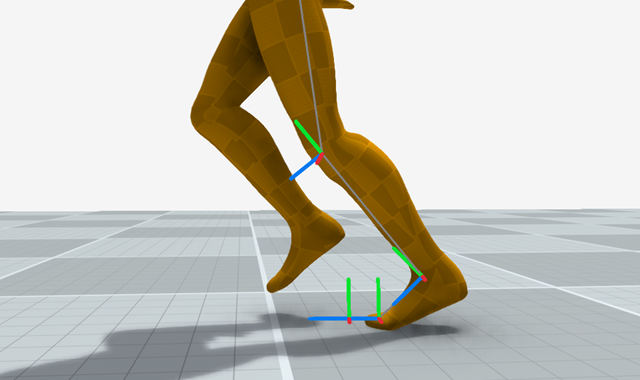
You might have some bad animation where the heel is intersecting the floor, and feel tempted to "lock" the heel during this pose - but you really shouldn't - you will get much nicer looking results the more freedom you give to the heel to move.
So when we think about solving the IK problem we should basically forget about locking the heel and focus almost entirely on constraining the toe.
Which brings my onto the third important point
Inverse Kinematics is a modification, not a replacement
When people think of two-joint inverse kinematics they often think of a process which is going to replace the pose of three joints based on some procedural rules and (for example) a pole-vector:

And this is usually how things are set up when doing rigging, as you can see above.
But inverse kinematics doesn't always have to be applied in that way - instead it can be applied as a minimal modification to an existing animation where we move joints to some target location, but preserve the rotations of the bones as much as possible. And this is how it works in my little recipe for foot locking - because we want to preserve as much as possible of the existing animation including all the nuances around the heel and toe relations, and subtle twists etc.
And there is a final important thing to keep in mind which I didn't touch on much...
Avoid the dinosaur
The final common issue I see with over-applying foot locking is pulling the character hips down to give the legs more extension room and avoid hyper-extension. But unfortunately this bending of the knees creates a t-rex effect:
If you examine real animation data you will see that the leg is often extremely close to hyper-extension. This is one thing that makes foot-locking so difficult.
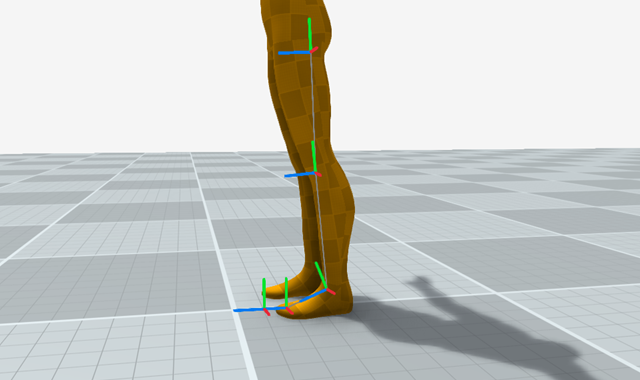
If you pull down the hips you wont get hyper-extension but your animation will look bad. In this case I feel that it is almost always better to just let the feet slide, which is why in my recipe I limit the extension so what is in the input animation.
So my final advice is this: a little bit of sliding is a lot better than breaking the source animation just so the motion is mechanically correct. In fact, stop thinking about it in terms of sliding (because the physics and friction metaphor can lead you down the wrong paths), and start thinking about it in terms of input motion velocity preservation.
I hope all of that has been insightful and perhaps seeded a few ideas of how to resolve foot-sliding in your own animation systems. All of the source code for this article can be found here. And as always, thanks for reading!